Party pranks & gag gifts
Funny text conversation ideas for memes, skits and birthday cards
Text screenshots are one of the most shared formats on the internet: everyone knows how to read one, and the punchline lands on the last bubble. Here are funny conversation scripts you can use for memes, video skits, short films and birthday cards, plus tips for writing your own.
Why text screenshots work
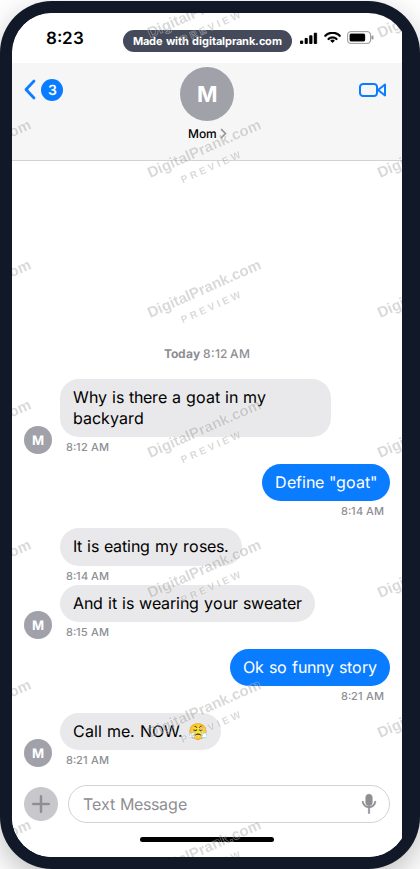
A chat is a comic strip everyone already knows how to read: setup, escalation, punchline, one bubble at a time. You don't need drawing skills or video editing, just a good script. The Text Message Generator makes it look like a real phone screenshot: iPhone or Android style, light or dark mode, the contact's name and photo, any dates and times, the battery and clock at the top. You can export just the phone screen, or the whole chat as one long picture.
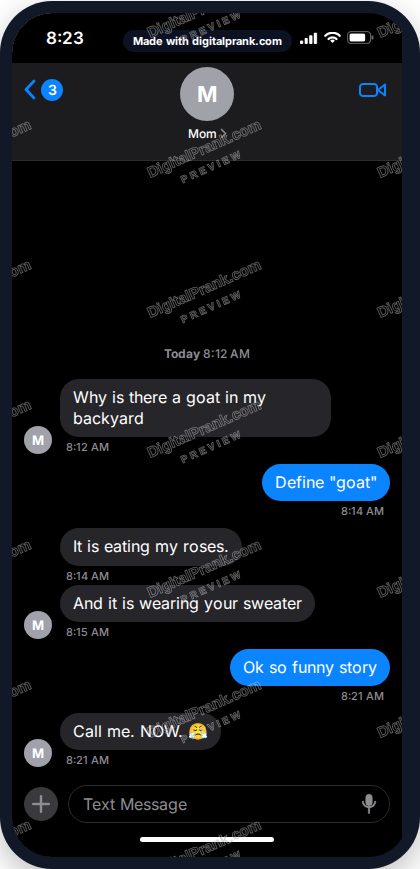
iPhone or Android, light or dark mode.
Scripts you can use
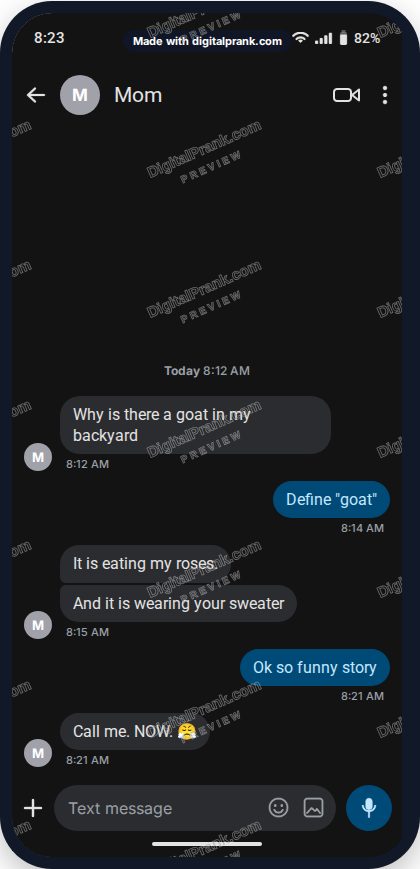
1. The parent who discovered something
Mom: Why is there a goat in my backyard
You: Define "goat"
Mom: It is eating my roses.
Mom: And it is wearing your sweater
You: Ok so funny story
Mom: Call me. NOW. 😤
2. The roommate food crime
Roommate: Did you eat my pizza
You: Which pizza
Roommate: The one with my NAME on the box
You: I thought that was the brand
3. The group chat plan that never happens
Sam: Camping this weekend??
Alex: YES
Jo: I'm in
Sam: Ok who has a tent
(no replies for 3 days)
Sam: So... hotel?
4. Texts from the dog
Buddy: where r u
Buddy: its been 4 minutes
Buddy: i ate the couch. not sorry
Buddy: ok a little sorry. come home pls
Use your dog's photo as the contact picture. These do brilliantly on pet accounts.
5. The autocorrect disaster
Dad: Your mother and I are going to the furniture store to buy a new couch. We'll be back in an hour.
Dad: *couch
You: You wrote couch both times
Dad: I know. I'm just very excited about the couch.
6. Texts from your future self
You (2035): Hey it's you from the future
You (2035): Buy the bitcoin. Also don't get the bangs.
You: Which bitcoin
You (2035): Forget the bitcoin. SERIOUSLY. THE BANGS.
7. The grandparent learning to text
Grandma: HELLO DEAR THIS IS GRANDMA
Grandma: HOW DO I TURN OFF THE CAPITALS
Grandma: never mind. I found it. Love you. Grandma
Birthday and holiday ideas
The birthday card chat
Print a chat as the inside of a birthday card: a fake conversation between the birthday person's pets, kids or houseplants planning their party. Cat: Did you get the cake? Dog: I got the cake. Cat: Where is it? Dog: ...inside me.
The Santa chat
For kids at Christmas: a chat with "Santa 🎅" checking on their list. "Elves report your room is very tidy this week. Keep it up!" It's a sweet tradition many parents use to encourage good behaviour in December.
The anniversary throwback
Recreate your very first texts to each other (from memory) and give them as an anniversary card. Add today's date at the end with a new message.
For creators: skits, memes and short films
- Video skits: make each step of the conversation as a separate screenshot and reveal them one by one in your edit. That's the classic "text story" format on TikTok and YouTube Shorts.
- Short films and school projects: a text screen is a quick way to show a plot point without filming a phone. Use dark mode for night scenes.
- Memes: keep it to 3 to 5 bubbles. The punchline should be the last bubble, on its own.
- Teaching: teachers use made-up chats to show texting etiquette, online safety and scam warning signs, without using anyone's real messages.
Tips for writing a funny chat
- Start normal. The first message should sound real. The joke comes from where it goes.
- Use timing. Change the times between messages to tell the story: a 3-day gap says more than any words.
- Short bubbles win. Real people send several short messages, not one paragraph.
- End on the reply. The last bubble is the punchline. Don't explain it.
- Details sell it. A contact photo, the unread badge and the battery percentage make it look like a real screenshot.
How to make it
- Open the Text Message Generator and pick a phone style (iPhone or Android, light or dark).
- Start from a ready-made conversation or a blank chat.
- Set the contact name and photo, the clock, battery and unread number.
- Add messages one by one: choose who sends each one, type the message, and set the date and time.
- Choose "Phone screen" or "Whole chat (long)" and download the HD picture or PDF.
Live preview, iPhone and Android.